
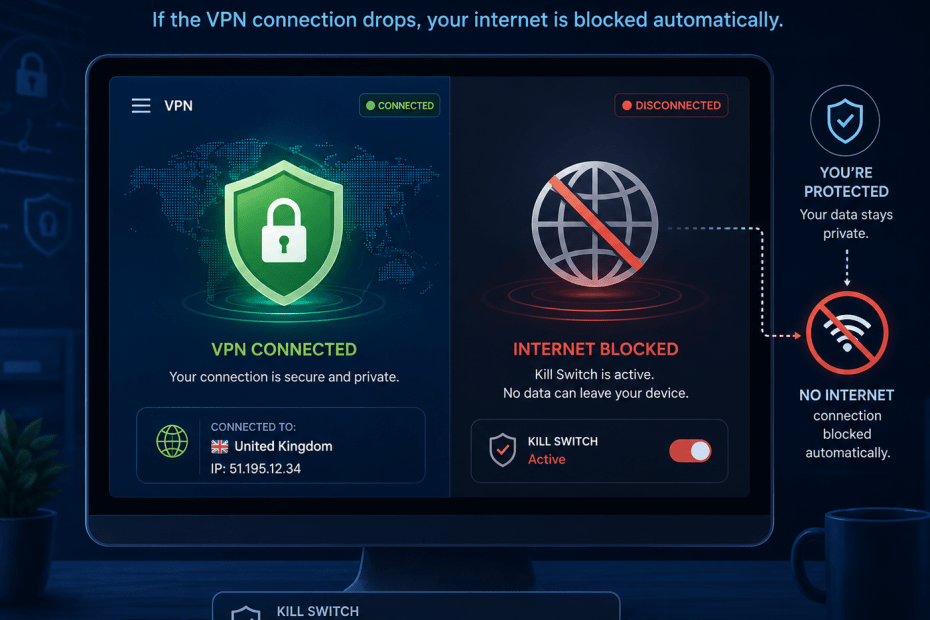
Understanding the VPN Kill Switch and Its Role in Online Privacy
A virtual private network (VPN) is a popular tool for protecting your online privacy, encrypting your internet traffic and masking your IP address. However, a VPN only safeguards your data while the connection remains active. If the VPN connection unexpectedly drops, your internet activity can become exposed without you realising it. This is where a VPN kill switch plays a vital role.
A VPN kill switch is a security feature designed to automatically block your internet access if the VPN connection is lost. This prevents your device from sending data over an unsecured connection, maintaining your privacy even when the VPN fails. Understanding how a kill switch works and why it’s important can help you make more informed decisions about your online security.
How a VPN Kill Switch Works
At first glance, the concept of a kill switch seems straightforward. It monitors the VPN connection constantly, and if it detects a disconnection, it immediately stops your device from accessing the internet. This halts any data transmission until the VPN reconnects or you manually disable the kill switch.
In practice, the kill switch operates at the system or application level, depending on the VPN provider. Some kill switches block all internet traffic, while others might block traffic only from specific apps or services. For example, if you’re using a VPN to access geo-restricted streaming content, the kill switch ensures you don’t accidentally reveal your true location if the VPN drops.
Practical Example: Streaming and Downloads
Imagine you’re streaming a popular show that’s only available in another country. With a VPN enabled, your IP address appears to be in that region, allowing access. If the VPN connection suddenly drops, your real IP address might be exposed, potentially blocking access or alerting the service you’re not in the authorised location. A kill switch prevents this by cutting off internet access until the VPN reconnects.
Similarly, if you’re downloading files through a VPN and the connection fails, the kill switch stops your device from continuing the download over an unsecured connection. This keeps your data private and your true location hidden.
Why a VPN Kill Switch Matters
Many VPN users assume their privacy is protected at all times once connected. It’s easy to forget that VPN connections can be unstable, especially on mobile networks or when switching between Wi-Fi and cellular data. Without a kill switch, these brief interruptions can reveal your real IP address and potentially expose sensitive data.
This matters because even a short leak can allow third parties—such as advertisers, internet service providers, or hackers—to track your online activity. For users in countries with strict censorship or surveillance, the consequences can be more serious.
One area where a kill switch stands out is in maintaining anonymity. If you rely on a VPN to prevent location tracking or to encrypt communications, a dropped connection without a kill switch can undermine those protections.
Trade-Offs and Limitations
While a kill switch improves security, it can also interrupt your internet experience. For example, if your VPN connection drops frequently, your internet access could be repeatedly cut off, which can be frustrating. Some users may prefer to tolerate brief privacy risks rather than lose connectivity.
Additionally, not all kill switches are created equal. Some are more effective than others, and implementation varies between providers. It’s worth checking how a VPN’s kill switch functions before committing to a service.
According to Avast, their SecureLine VPN includes an “ironclad” kill switch designed to provide reliable protection, automatically blocking internet traffic if the VPN disconnects source. This kind of robust implementation can offer extra peace of mind.
Choosing a VPN with a Kill Switch
Before making a decision, check if the VPN provider offers a kill switch and how it works. Some VPN apps let you toggle the kill switch on or off, giving you control over when it’s active. For most people, enabling the kill switch is advisable to maintain privacy consistently.
It’s also worth considering the device and operating system you use. Some kill switches are better integrated into certain platforms. For instance, a VPN might have a more reliable kill switch on Windows than on Android or iOS.
Conclusion: Should You Use a VPN Kill Switch?
A VPN kill switch is a sensible security feature that helps maintain your privacy when the VPN connection drops. It automatically blocks internet traffic until the VPN reconnects, preventing unprotected data leaks. While it can occasionally disrupt your internet access, the protection it offers outweighs this inconvenience for many users.
If privacy is your priority, using a VPN with a dependable kill switch is a practical step to protect your online activities from unintended exposure.
Frequently Asked Questions About VPN Kill Switches
What happens if my VPN disconnects without a kill switch?
If your VPN disconnects and there’s no kill switch, your internet traffic will continue over your regular connection, exposing your IP address and data to anyone monitoring your network.
Can I turn a VPN kill switch off?
Most VPNs allow you to disable the kill switch if you prefer uninterrupted internet access despite the privacy risk. However, it’s generally safer to keep it enabled.
Do all VPNs include a kill switch?
No, not all VPN services provide a kill switch. It’s important to verify this feature before subscribing, especially if privacy is a concern.
Does a kill switch work on all devices?
Implementation varies by provider and device. Some VPN apps offer kill switches on desktop operating systems but may have limited or no support on mobile platforms.
Will a kill switch protect me if my VPN connection drops temporarily?
Yes, the kill switch is designed to block internet traffic immediately upon disconnection, protecting you during temporary drops until the VPN reconnects.
Pingback: The Best VPNs for Torrenting in 2026 - Compare VPNs