- 1. What is a VPN?
- 2. What does VPN stand for?
- 3. How does a VPN work?
- 4. Why do people use a VPN?
- 5. Do I really need a VPN?
- 6. Is a VPN worth paying for?
- 7. What are the benefits of using a VPN?
- 8. What are the disadvantages of using a VPN?
- 9. Can anyone use a VPN?
- 10. Is a VPN difficult to set up?
- 11. Does a VPN make me anonymous online?
- 12. Does a VPN hide my IP address?
- 13. Can my internet provider still see what I’m doing?
- 14. Can websites still track me if I use a VPN?
- 15. Can Google track me while using a VPN?
- 16. Does a VPN encrypt all of my internet traffic?
- 17. Can hackers hack a VPN?
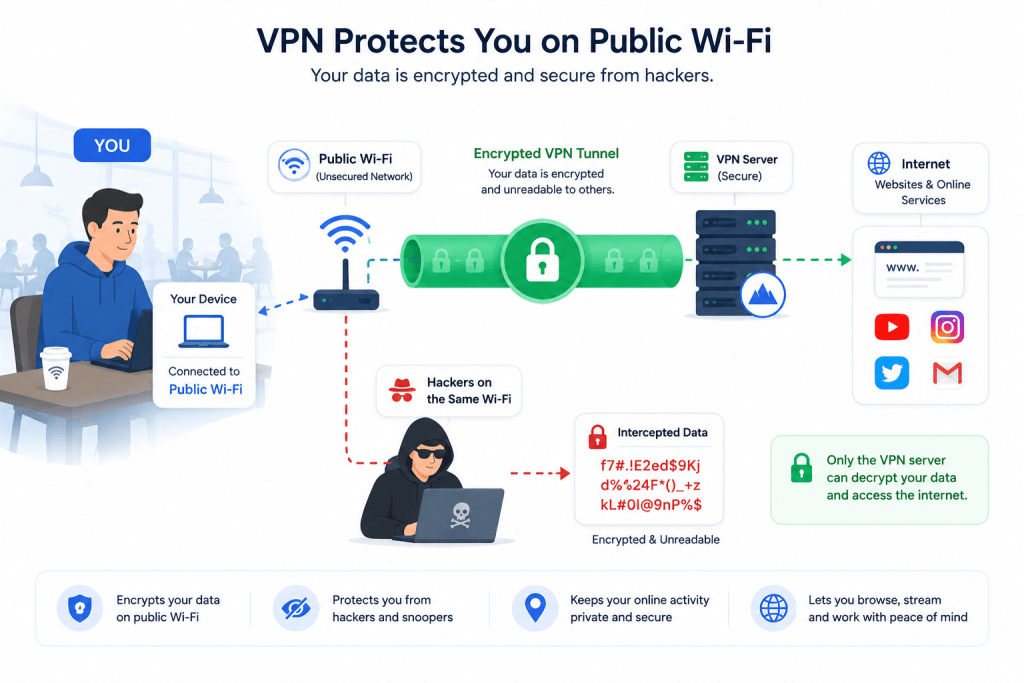
- 18. Does a VPN protect me on public Wi-Fi?
- 19. Can a VPN stop phishing attacks?
- 20. Does a VPN stop malware or viruses?
- 21. Can a VPN protect my passwords?
- 22. Can a VPN prevent identity theft?
- 23. What is a no-logs VPN?
- 24. Can police track someone using a VPN?
- 25. Can governments see VPN traffic?
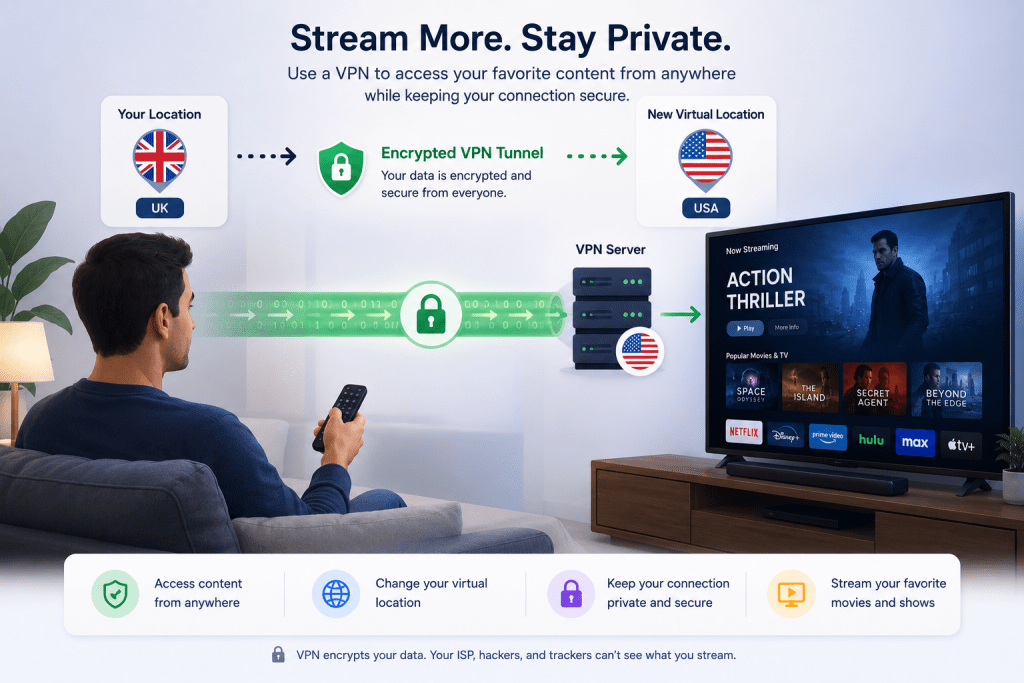
- 26. Can I watch Netflix with a VPN?
- 27. Which VPN works best with Netflix?
- 28. Can I watch BBC iPlayer abroad?
- 29. Can I access US Netflix from the UK?
- 30. Why isn’t my VPN working with Disney+?
- 31. Can I stream Amazon Prime Video with a VPN?
- 32. Can I watch Hulu outside the US?
- 33. Do VPNs work with YouTube TV?
- 34. Will a VPN improve streaming quality?
- 35. Can a VPN help if my ISP is throttling my connection?
- 36. Is using a VPN for gaming a good idea?
- 37. Can a VPN reduce ping?
- 38. Can a VPN prevent DDoS attacks?
- 39. Can I use a VPN on Xbox?
- 40. Can I use a VPN on PlayStation?
- 41. Can a VPN help me find easier game lobbies?
- 42. Will a VPN slow down online gaming?
- 43. Which VPN is best for gaming?
- 44. Is torrenting with a VPN legal?
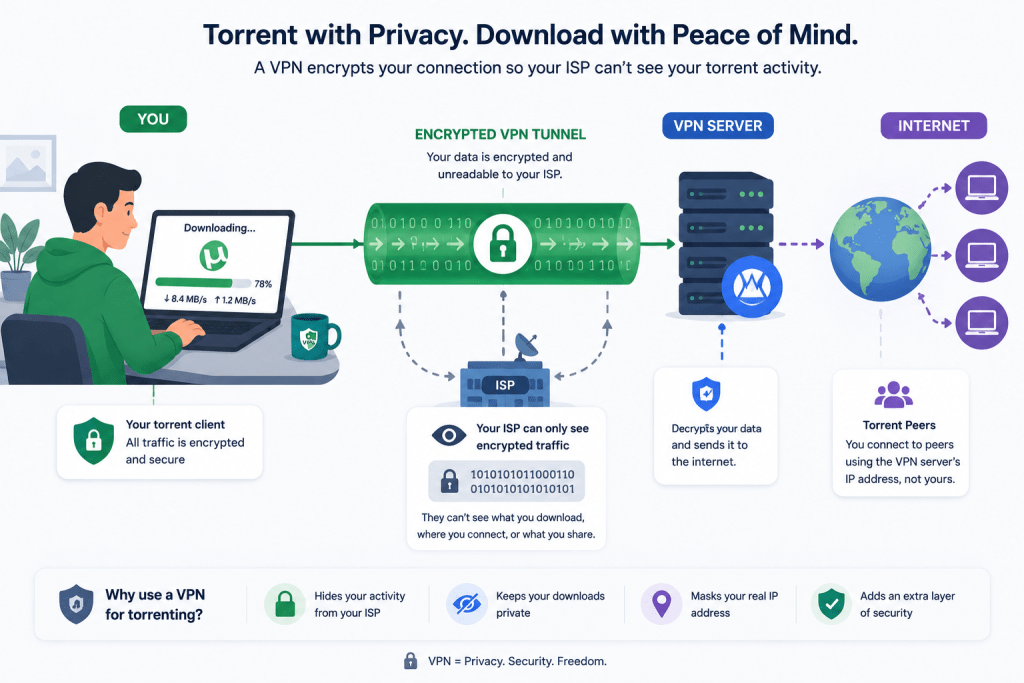
- 45. Can my ISP see torrents if I use a VPN?
- 46. Which VPNs allow P2P traffic?
- 47. Should I always use a VPN when torrenting?
- 48. Can copyright notices still happen with a VPN?
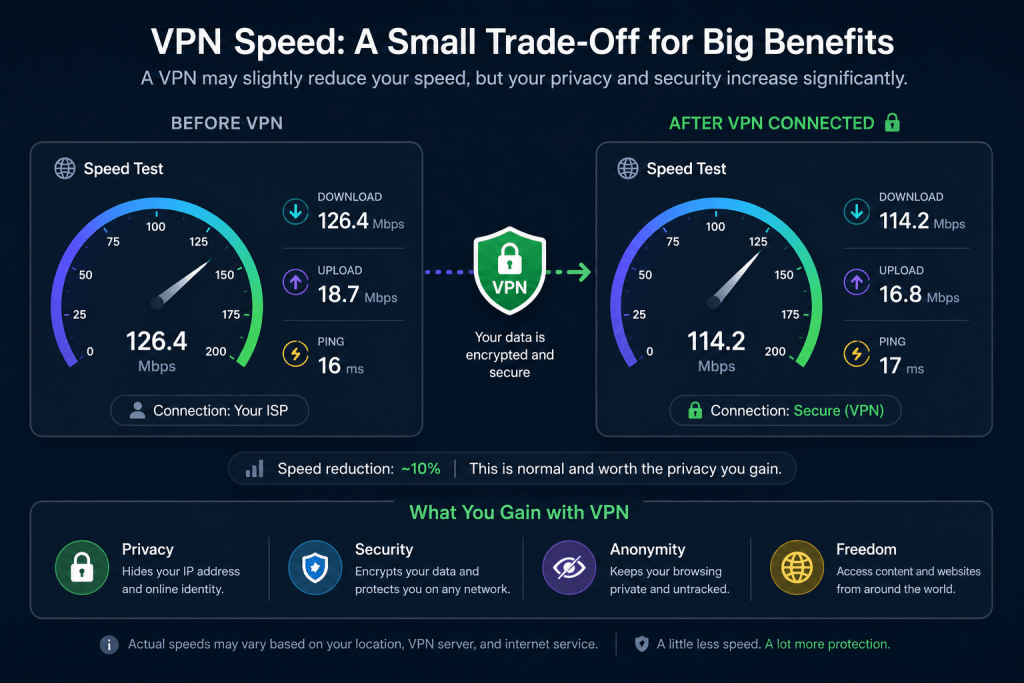
- 49. Does a VPN slow down internet speeds?
- 50. Why is my VPN so slow?
- 51. Which VPN is the fastest?
- 52. How can I make my VPN faster?
- 53. Does server distance affect VPN speed?
- 54. Does changing VPN protocols improve performance?
- 55. How much speed loss is normal?
- 56. Can I use a VPN on my phone?
- 57. Can I use a VPN on my laptop?
- 58. Can I install a VPN on my router?
- 59. Can I use a VPN on a Smart TV?
- 60. Can I use one VPN account on multiple devices?
- 61. Does Windows include a VPN?
- 62. Does Apple include a VPN?
- 63. Can I use a VPN on Linux?
- 64. Can I use a VPN on Amazon Fire TV Stick?
- 65. Can I install a VPN on Chromecast?
- 66. Are free VPNs safe?
- 67. What’s the catch with free VPNs?
- 68. Do free VPNs sell your data?
- 69. Are there any trustworthy free VPNs?
- 70. What’s the difference between free and paid VPNs?
- 71. Are VPNs legal?
- 72. Which countries ban or restrict VPNs?
- 73. Can I use a VPN in China?
- 74. Can I use a VPN in the UAE?
- 75. Can I use a VPN while travelling?
- 76. Should I install a VPN before travelling?
- 77. Can hotels block VPNs?
- 78. How do I choose the best VPN?
- 79. Which VPN is best for beginners?
- 80. What features should I look for in a VPN?
- 81. What is a kill switch?
- 82. What is split tunnelling?
- 83. Which VPN protocol should I use?
- 84. What’s the difference between OpenVPN and WireGuard?
- 85. What is MultiHop or Double VPN?
- 86. Should I pay monthly or yearly for a VPN?
- 87. How much should a VPN cost?
- 88. Can a VPN leak my IP address?
- 89. What is a DNS leak?
- 90. How do I test if my VPN is working?
- 91. Why does my VPN keep disconnecting?
- 92. Can I leave my VPN on all the time?
- 93. Should I use the nearest server?
- 94. Which server location should I choose?
- 95. Can I use a VPN with antivirus software?
- 96. Which VPN is the best overall?
- 97. Which VPN is the fastest in 2026?
- 98. Which VPN is best for privacy?
- 99. Which VPN offers the best value for money?
- 100. Is a VPN still worth using in 2026?
Whether you’re completely new to VPNs or you’ve used one for years, you’ve probably got questions. Do they really keep you private? Can they unblock streaming services? Will they slow down your internet? And are free VPNs actually safe?
This guide answers the most common VPN questions in plain English, without the technical jargon. We’ll explain how VPNs work, where they help, where they don’t, and what to look for if you’re thinking about signing up for one.
We’ve tested dozens of VPN providers over the years and regularly update our recommendations as services change. The answers below are based on real-world testing, current privacy practices, and the features that matter most to everyday users.
1. What is a VPN?
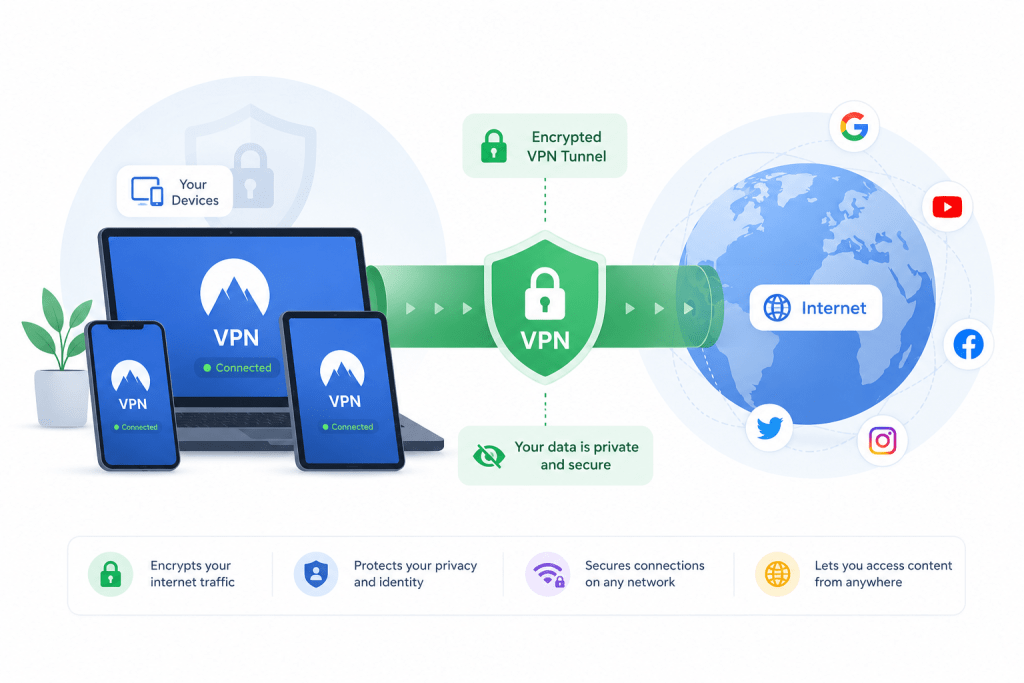
A VPN, or Virtual Private Network, is a service that creates a secure, encrypted connection between your device and the internet. Instead of websites seeing your real IP address and approximate location, they see the IP address of the VPN server you’re connected to.
Think of it like sending your internet traffic through a private tunnel. Anyone trying to look in from the outside, whether that’s someone using the same public Wi-Fi or even your internet provider, has far less information about what you’re doing.
People use VPNs for lots of different reasons. Some want extra privacy when browsing, others want to protect themselves on public Wi-Fi, while many use a VPN to access content that’s only available in certain countries. A VPN won’t solve every online privacy problem, but it’s one of the simplest tools you can use to improve your security online.
2. What does VPN stand for?
VPN stands for Virtual Private Network.
“Virtual” means the secure connection is created using software rather than a physical cable. “Private” refers to the encrypted connection between your device and the VPN server, making it much harder for other people to intercept your data. “Network” simply describes the connection that carries your internet traffic.
While the name sounds technical, using a VPN usually isn’t. Most modern VPN apps only require you to sign in and click a single Connect button before they begin protecting your connection.
3. How does a VPN work?
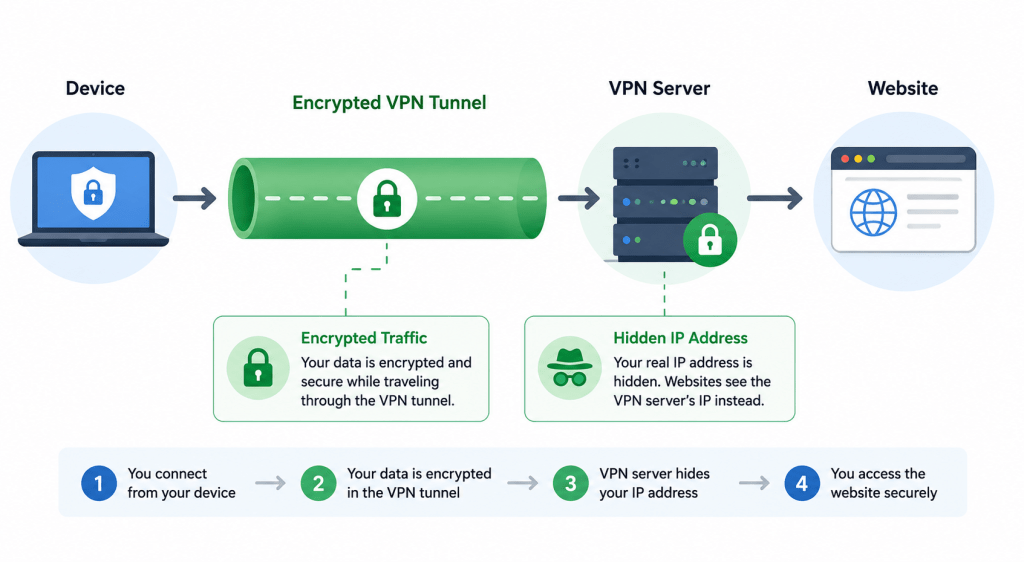
When you connect to a VPN, your internet traffic is encrypted before it leaves your device. That encrypted data travels to a VPN server, which decrypts it and sends it to the website or service you’re trying to access.
The process only adds a small extra step, but it changes what other people can see. Your internet provider can usually tell that you’re connected to a VPN, but it can’t easily see the websites you’re visiting or the data you’re sending. At the same time, the websites you visit see the VPN server’s IP address instead of your own.
This is why a VPN can make it appear as though you’re browsing from another city or country, even though you’re sitting at home.
4. Why do people use a VPN?
There isn’t just one reason to use a VPN. Different people use them for different situations.
Some people simply want more privacy and don’t like their internet provider collecting browsing data. Others regularly use public Wi-Fi in airports, hotels or cafés and want an extra layer of security while connected.
Streaming is another popular reason. Many VPN users connect to servers in other countries to access content that isn’t available where they live. Gamers often use VPNs to protect themselves from DDoS attacks or to improve routing in certain games, while frequent travellers rely on VPNs to access services from home when they’re abroad.
For most people, it’s a combination of privacy, security and convenience rather than one single feature.
5. Do I really need a VPN?
Not everyone needs a VPN, but many people can benefit from using one.
If you mostly browse trusted websites from home and don’t mind your internet provider having access to your browsing metadata, you may not feel a strong need for one. On the other hand, if you use public Wi-Fi, travel regularly, stream content from different countries or simply value your online privacy, a VPN can be a worthwhile investment.
A VPN shouldn’t be viewed as a replacement for good security habits. You should still use strong passwords, enable two-factor authentication and keep your devices updated. Think of it as another layer of protection rather than a complete solution.
6. Is a VPN worth paying for?
In most cases, yes.
Paid VPNs usually offer faster servers, stronger privacy policies, more locations, better customer support and features like kill switches, split tunnelling and malware blocking. They’re also far more reliable for streaming and everyday use.
Free VPNs can be useful if you only need occasional protection, but many come with strict data limits, fewer servers and slower speeds. Some even make money by collecting usage data or showing adverts.
If you plan to use a VPN regularly, paying a few pounds or dollars each month is often money well spent.
7. What are the benefits of using a VPN?
One of the biggest advantages is improved privacy. A VPN hides your real IP address from the websites you visit and encrypts your internet traffic, making it harder for others to monitor your activity.
It also makes public Wi-Fi much safer, helps protect sensitive information while travelling, and gives you access to servers in countries around the world. Depending on the provider, you may also benefit from built-in ad blockers, tracker blocking, password breach monitoring or malware protection.
While no VPN makes you invisible online, it can significantly improve your privacy and security when used alongside sensible online habits.
8. What are the disadvantages of using a VPN?
No technology is perfect, and VPNs have a few downsides.
Because your data takes an extra step through a VPN server, you may notice a small drop in internet speed. Premium VPNs minimise this, but some slowdown is normal.
Some websites actively block VPN traffic, particularly streaming platforms and banking websites. You may occasionally need to switch servers before everything works normally again.
Finally, using a VPN requires trust. That’s why choosing a reputable provider with an independently audited no-logs policy is far more important than simply picking the cheapest option.
9. Can anyone use a VPN?
Yes. VPNs are designed for everyone, not just technology experts.
Most providers have apps for Windows, macOS, Android, iPhone, Smart TVs and even routers. Installation usually takes just a few minutes, and connecting often involves nothing more than selecting a server and clicking one button.
Whether you’re a student, remote worker, gamer, traveller or simply someone who values privacy, there’s very little technical knowledge required to get started.
10. Is a VPN difficult to set up?
Not anymore.
Years ago, configuring a VPN often involved manually entering server addresses and security settings. Today, most providers have simplified the process so that anyone can install an app, sign in and connect within a few minutes.
Many VPNs even recommend the fastest server automatically, enable security features by default and update themselves in the background. Unless you’re configuring a VPN on a router or business network, the setup process is usually no more complicated than installing any other app.
11. Does a VPN make me anonymous online?
Not completely, and any VPN that claims it does is overselling what the technology can actually achieve.
A VPN significantly improves your privacy by hiding your IP address and encrypting your internet traffic, but it doesn’t make you invisible. If you log into your Google account, Facebook, Amazon or any other online service, those companies still know who you are because you’ve identified yourself by signing in.
Your browser, cookies, device fingerprinting and the information you choose to share online can also be used to identify you. A VPN is one piece of the privacy puzzle, not a magic cloak that hides everything.
For most people, that’s perfectly fine. The goal of a VPN is to make your online activity more private and secure, not to erase your digital identity entirely.
12. Does a VPN hide my IP address?
Yes. Hiding your IP address is one of the main things a VPN does.
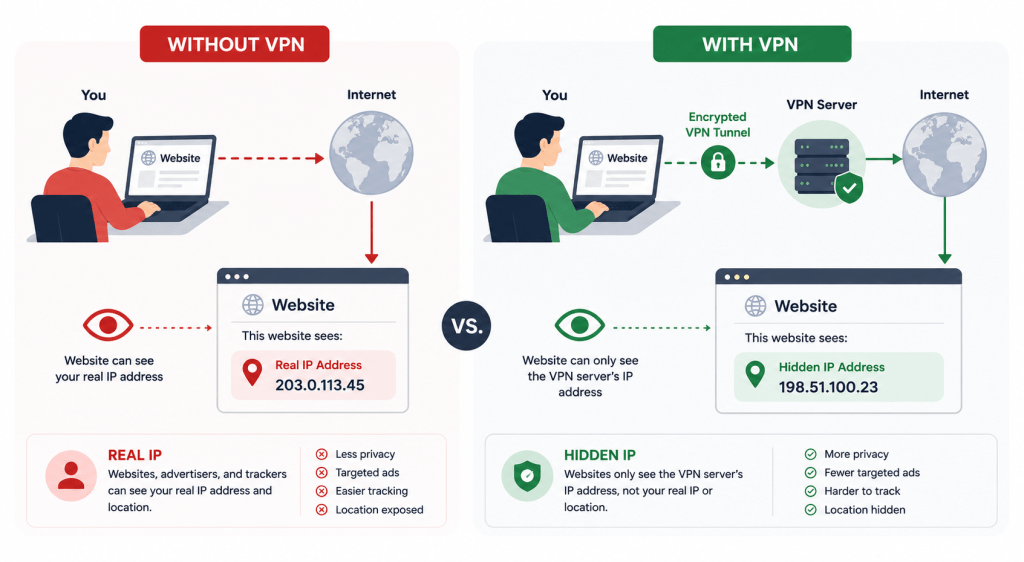
Normally, every website you visit can see your public IP address, which gives away your approximate location and identifies the internet connection you’re using. Once you’re connected to a VPN, websites see the VPN server’s IP address instead.
For example, if you’re browsing from Birmingham but connected to a VPN server in New York, websites will generally think you’re browsing from the United States.
This makes it harder for websites, advertisers and other third parties to link your browsing activity directly to your home internet connection.
13. Can my internet provider still see what I’m doing?
Your internet provider can usually tell that you’re connected to a VPN, but it can’t easily see the websites you’re visiting or the information you’re sending through the encrypted tunnel.
Without a VPN, your ISP can often see the domains you visit and other details about your internet activity. With a VPN, much of that information is hidden because the traffic is encrypted before it leaves your device.
Your provider will still know how much data you’re using and that you’re connected to a VPN server, but not the content of your browsing sessions.
14. Can websites still track me if I use a VPN?
Yes, they can.
A VPN hides your IP address, but websites have many other ways to recognise returning visitors. Cookies, browser fingerprinting, login accounts and tracking scripts can all be used to build a profile of your activity.
Imagine visiting an online shop while logged into your account. Even if your IP address changes because you’re using a VPN, the website still knows it’s you because you’ve signed in.
If privacy is your goal, it’s worth combining a VPN with a privacy-focused browser, blocking third-party cookies and regularly clearing your browsing data.
15. Can Google track me while using a VPN?
Yes, if you’re using Google services while signed in.
A VPN hides your IP address from Google, but it doesn’t stop Google recognising your account. If you’re logged into Gmail, YouTube, Google Search or Google Maps, your activity can still be associated with your Google account.
If you search Google while signed out, use private browsing and block tracking cookies, Google has much less information to work with. Even then, browser fingerprinting and other techniques may still identify your device.
A VPN improves privacy, but it doesn’t replace good privacy habits.
16. Does a VPN encrypt all of my internet traffic?
In most cases, yes.
Once connected, a VPN encrypts the internet traffic that passes through the VPN connection. That means your browsing, app activity and many online services are protected while travelling between your device and the VPN server.
However, there are a few exceptions. Traffic that never leaves your local network, devices that aren’t connected to the VPN, or apps configured to bypass the VPN using split tunnelling won’t be encrypted by the VPN.
It’s also worth remembering that websites using HTTPS already encrypt data between your browser and their servers. A VPN adds another layer of encryption before your traffic even reaches the wider internet.
17. Can hackers hack a VPN?
A well-built VPN using modern encryption is extremely difficult to break directly.
The bigger risk usually isn’t the encryption itself but weak passwords, compromised devices or fake VPN apps pretending to be legitimate services. If someone gains access to your laptop because it’s infected with malware, a VPN can’t stop that.
This is why it’s important to choose a trusted VPN provider, keep your apps updated and enable features like multi-factor authentication where available.
Think of a VPN as strengthening your connection, not making you invincible.
18. Does a VPN protect me on public Wi-Fi?
Yes, and this is one of the best reasons to use one.
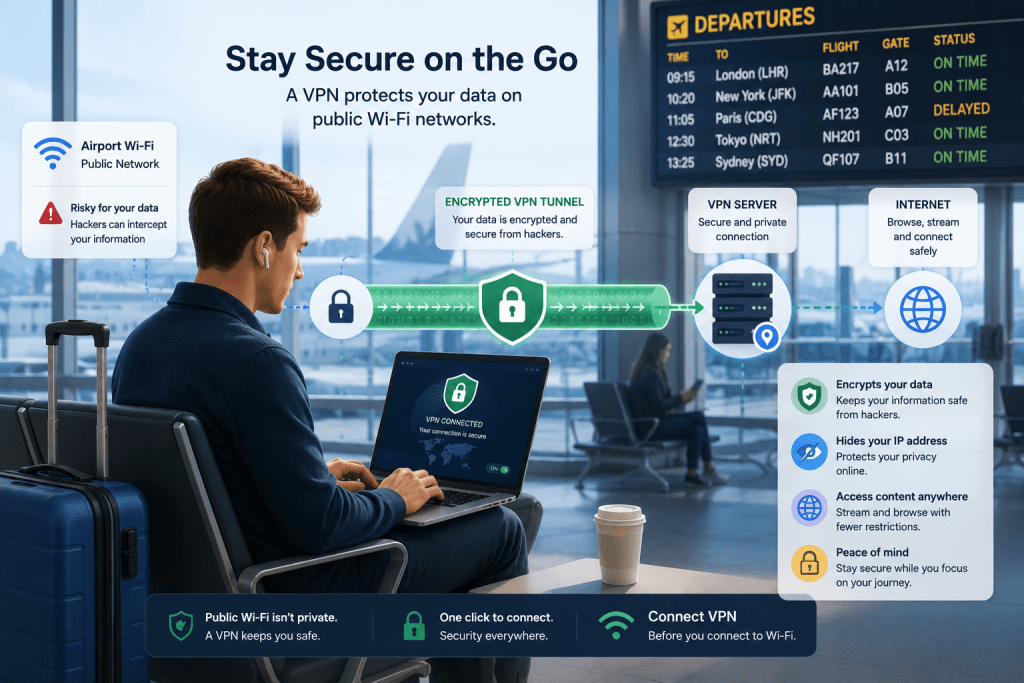
Public Wi-Fi networks in cafés, hotels, airports and shopping centres are often shared by dozens or even hundreds of people. While many websites already use encryption, unsecured networks can still expose you to certain risks if you’re not careful.
A VPN encrypts your connection before your data travels across the Wi-Fi network, making it much harder for anyone nearby to intercept sensitive information.
If you regularly work from coffee shops or travel with your laptop, leaving your VPN switched on is a sensible habit.
19. Can a VPN stop phishing attacks?
No.
A VPN doesn’t know whether an email is genuine or whether a website is trying to trick you into revealing your password. If you enter your banking details into a fake website, a VPN won’t prevent that.
Some premium VPN providers include built-in phishing protection that blocks known malicious websites before they load, but that’s an extra feature rather than something every VPN provides.
The best defence against phishing is still being cautious, checking website addresses carefully and enabling two-factor authentication wherever possible.
20. Does a VPN stop malware or viruses?
Not by itself.
A VPN encrypts your internet connection, but it doesn’t scan files for malware or remove viruses that are already on your device.
Many premium VPN providers now include additional security tools that can block known malicious websites, prevent dangerous downloads or warn you about suspicious links. These features are useful, but they shouldn’t replace dedicated antivirus software.
For the best protection, use a VPN alongside reliable antivirus software, keep your operating system updated and avoid downloading files from untrusted sources.
21. Can a VPN protect my passwords?
A VPN helps protect your passwords while they’re travelling across the internet, but it doesn’t protect the passwords themselves.
When you’re connected to a VPN, your internet traffic is encrypted before it leaves your device. That makes it much harder for someone on the same public Wi-Fi network to intercept sensitive information, including login credentials.
However, if your password is weak, reused across multiple websites, or stolen in a data breach, a VPN can’t stop someone from using it. The best approach is to combine a VPN with strong, unique passwords and a reputable password manager. Enabling two-factor authentication wherever it’s available adds another valuable layer of security.
22. Can a VPN prevent identity theft?
A VPN can reduce some of the risks that contribute to identity theft, but it can’t prevent it entirely.
For example, encrypting your connection on public Wi-Fi makes it far more difficult for criminals to intercept sensitive information while you’re browsing. Hiding your IP address also gives advertisers and data brokers less information about your online activity.
That said, identity theft often starts with phishing emails, stolen passwords, malware or data breaches at companies you’ve trusted with your information. Those threats exist whether you’re using a VPN or not.
A VPN should be viewed as one part of a broader security strategy rather than a complete solution.
23. What is a no-logs VPN?
A no-logs VPN is a provider that says it doesn’t keep records of your online activity while you’re connected to its service.
In theory, that means the company doesn’t store details such as the websites you visit, your browsing history, downloaded files or the IP addresses assigned to you during a session.
Not all no-logs policies are equal, though. Some providers still collect basic information such as connection timestamps, bandwidth usage or anonymous diagnostic data to help keep their service running smoothly.
The most trustworthy VPN companies back up their claims with independent security audits. These audits don’t guarantee perfection, but they provide far more confidence than marketing promises alone.
24. Can police track someone using a VPN?
The answer depends on the situation.
A VPN hides your real IP address from the websites you visit, making it more difficult to trace your internet connection directly. However, law enforcement agencies have many investigative tools that go far beyond looking at an IP address.
If someone logs into personal accounts, leaves identifying information online, or uses a VPN provider that keeps logs, investigators may still be able to gather useful evidence.
It’s also important to remember that VPNs are designed to improve privacy, not to help people break the law. Reputable providers make this clear and expect customers to use their services responsibly.
25. Can governments see VPN traffic?
In many countries, governments can usually tell that you’re using a VPN, but they generally can’t see the encrypted data travelling through the VPN tunnel.
Instead of seeing the websites you visit, they typically see an encrypted connection between your device and the VPN server.
Some countries place restrictions on VPN usage or attempt to block VPN connections altogether. In those situations, some providers offer features such as obfuscated servers, which make VPN traffic appear more like normal internet traffic.
If you’re travelling abroad, it’s worth checking the local laws before relying on a VPN.
26. Can I watch Netflix with a VPN?
Yes, many VPNs can access Netflix, although success varies depending on the provider and the country you’re connecting to.
Streaming services actively try to detect and block VPN servers because of licensing agreements. As a result, not every VPN works consistently, and a server that works today may be blocked tomorrow.
The better VPN providers regularly refresh their server networks and offer servers specifically optimised for streaming. If one server doesn’t work, switching to another is often enough to solve the problem.
If streaming is one of your main reasons for getting a VPN, it’s worth choosing a provider with a proven track record rather than simply picking the cheapest option.
27. Which VPN works best with Netflix?
There’s no single answer because streaming services constantly update their detection methods.
The providers that tend to perform well invest heavily in maintaining streaming access and replacing blocked IP addresses. They also offer fast servers capable of handling high-definition and 4K streaming without constant buffering.
When comparing VPNs for Netflix, don’t just look at whether they work. Consider connection speeds, server locations, reliability and how quickly customer support responds if something stops working.
Regular testing is essential because performance can change throughout the year.
28. Can I watch BBC iPlayer abroad?
A VPN can sometimes allow you to access BBC iPlayer while you’re outside the UK by connecting to a UK-based server.
However, BBC iPlayer actively works to detect VPN connections, so success depends heavily on the provider you’re using. Premium VPN services generally perform much better than free alternatives because they update their server networks more frequently.
Keep in mind that BBC iPlayer requires a valid TV licence to watch live television or programmes on BBC iPlayer, regardless of where you’re connecting from.
29. Can I access US Netflix from the UK?
In many cases, yes.
By connecting to a VPN server located in the United States, your connection appears to originate from the US instead of the UK. If the VPN server isn’t blocked, Netflix may show the American catalogue instead of the British one.
Availability changes over time as Netflix updates its systems, so no VPN can honestly promise that every server will always work.
For the best experience, choose a provider that’s regularly tested with major streaming services and has multiple US server locations.
30. Why isn’t my VPN working with Disney+?
There are several possible reasons.
Disney+ regularly blocks IP addresses that it believes belong to VPN services. If you’re connected to one of those servers, the platform may detect the VPN and refuse to play content.
In many cases, simply switching to another server solves the problem. Clearing your browser cookies, restarting the app or reconnecting to a different location can also help.
If none of those steps work, it’s worth checking your VPN provider’s support pages. Many publish updated lists of the servers currently working with Disney+ and other popular streaming platforms.
31. Can I stream Amazon Prime Video with a VPN?
Yes, but as with other streaming services, your experience depends on the VPN you’re using.
Amazon Prime Video checks for VPN and proxy connections as part of its efforts to enforce regional licensing agreements. If it detects that you’re connected through a blocked VPN server, you may see an error message or find that certain titles are unavailable.
The better VPN providers regularly rotate their IP addresses and maintain servers that work with popular streaming platforms. If you run into problems, switching to another server is often enough to get things working again.
If streaming is one of your priorities, look for a VPN that’s consistently tested with Amazon Prime Video rather than relying on marketing claims.
32. Can I watch Hulu outside the US?
Hulu is officially intended for viewers in the United States, so it’s normally unavailable if you’re travelling or living abroad.
Many people use a VPN to connect to a US server, making it appear as though they’re browsing from within the country. Whether this works depends on how effectively your VPN avoids Hulu’s VPN detection systems.
It’s also worth remembering that you’ll still need a valid Hulu subscription. A VPN changes your apparent location, but it doesn’t provide access to subscription services you haven’t paid for.
33. Do VPNs work with YouTube TV?
They can, although results vary between providers.
YouTube TV is only available in the United States and uses location checks to verify where users are connecting from. A VPN may allow you to access the service while travelling, provided you’re connected to a suitable US server.
As with Netflix and other streaming platforms, Google regularly updates its detection methods. Choosing a VPN with a strong reputation for streaming support gives you the best chance of reliable access.
34. Will a VPN improve streaming quality?
Not usually.
A VPN can’t magically increase the quality of your internet connection. In fact, encrypting your traffic adds a small amount of overhead, so speeds may be slightly lower than they would be without a VPN.
However, there are situations where a VPN can actually improve your streaming experience. If your internet provider is slowing down video traffic during busy periods, a VPN may prevent that traffic shaping because your provider can’t easily see what you’re streaming.
In most cases, a fast internet connection and a high-quality VPN are all you need for smooth HD or 4K streaming.
35. Can a VPN help if my ISP is throttling my connection?
Sometimes, yes.
Internet providers occasionally slow down specific types of traffic, such as video streaming or large downloads, particularly during periods of heavy network congestion. This is known as bandwidth throttling.
Because a VPN encrypts your internet traffic, your provider may not be able to identify exactly what you’re doing online. If the throttling is based on the type of traffic rather than overall data usage, using a VPN may restore normal speeds.
It’s important to remember that a VPN can’t increase the speed of your broadband package. It can only help if your connection is being selectively slowed down.
36. Is using a VPN for gaming a good idea?
For many gamers, yes.
A VPN can hide your IP address from other players, making targeted DDoS attacks much more difficult. That’s one reason why competitive gamers and streamers often leave a VPN running during online matches.
In some cases, a VPN can also improve routing if your internet provider is sending traffic along an inefficient path. While this isn’t guaranteed, some players do notice more stable connections.
For casual gaming, the difference may be minimal, but the added privacy is often worthwhile.
37. Can a VPN reduce ping?
Sometimes, but not as often as people think.
Your ping depends largely on the physical distance between you and the game server. Since a VPN adds another stop along the journey, it’s more common for ping to increase slightly.
There are exceptions. If your internet provider is using a poor route to reach the game server, a VPN might provide a more direct path and actually reduce latency.
The only way to know for certain is to test both with and without the VPN. Results vary depending on your location, internet provider and the game you’re playing.
38. Can a VPN prevent DDoS attacks?
Yes, it’s one of the most useful benefits for online gamers.
A DDoS attack works by overwhelming a target’s internet connection with huge amounts of traffic. If another player knows your real IP address, they may be able to target your connection directly.
When you’re using a VPN, other players only see the VPN server’s IP address rather than your own. That makes it much harder for someone to launch an attack against your home internet connection.
While this won’t stop every possible attack, it provides an important layer of protection for anyone playing competitive multiplayer games.
39. Can I use a VPN on Xbox?
Yes, although Xbox consoles don’t include built-in VPN support.
The easiest way to use a VPN with an Xbox is by installing the VPN on your router. Once it’s configured, every compatible device connected to your home network, including your Xbox, automatically uses the VPN connection.
Some VPN providers also let you share a VPN connection from a Windows PC to your Xbox using an Ethernet cable.
If gaming is your main priority, it’s worth choosing a VPN with fast nearby servers to minimise any impact on latency.
40. Can I use a VPN on PlayStation?
Yes, but like Xbox, PlayStation consoles don’t allow VPN apps to be installed directly.
Most users either configure the VPN on their router or share a VPN connection from a computer. While this takes a little more effort than installing an app on your phone or laptop, it’s usually a one-time setup.
Once everything is configured, your PlayStation can benefit from the same privacy and IP protection as any other device connected through the VPN.
If you’re mainly interested in gaming rather than streaming, connecting to the nearest available VPN server will usually give you the best performance.
41. Can a VPN help me find easier game lobbies?
This is one of the biggest myths surrounding gaming VPNs.
Some players believe that connecting to a VPN server in another country will place them in less competitive lobbies. While this can occasionally happen, there’s no guarantee. Modern games use a mix of matchmaking systems, including skill-based matchmaking (SBMM), connection quality and player availability.
A VPN may change the server region you connect to, but it won’t automatically give you easier opponents.
If a VPN provider promises “bot lobbies” or guaranteed easy matches, it’s best to treat those claims with caution.
42. Will a VPN slow down online gaming?
A small increase in latency is normal because your traffic has to travel through the VPN server before reaching the game server.
With a high-quality VPN and a nearby server, the difference is often so small that most players won’t notice it. Free VPNs, overcrowded servers or connecting to another continent are much more likely to introduce lag.
If gaming is important to you, choose the closest available VPN server unless you have a specific reason to connect elsewhere.
43. Which VPN is best for gaming?
The best gaming VPN is usually one that offers fast speeds, low latency and a large network of servers.
Features such as WireGuard support, DDoS protection, stable connections and plenty of nearby server locations can all make a noticeable difference.
It’s also worth considering how reliable the VPN is during long gaming sessions. Frequent disconnects or unstable servers are far more frustrating than losing a few milliseconds of speed.
Rather than looking for a VPN marketed specifically for gamers, focus on overall performance and reliability.
44. Is torrenting with a VPN legal?
In many countries, yes.
Using a VPN is legal in most parts of the world, and torrenting itself is simply a method of transferring files between users. There are many legitimate uses for torrenting, including downloading open-source software and large public datasets.
The legal issues arise when copyrighted material is shared or downloaded without permission. A VPN doesn’t make illegal activity legal, nor does it give anyone permission to ignore copyright laws.
Always check the laws in your country and make sure you’re only downloading content you have the right to access.
45. Can my ISP see torrents if I use a VPN?
If your VPN is working correctly, your internet provider shouldn’t be able to see that you’re downloading torrents.
Without a VPN, your ISP can often identify BitTorrent traffic and may apply traffic management or send copyright notices if it receives complaints from copyright holders.
When your VPN encrypts your connection, your ISP can usually see that you’re connected to a VPN server, but it can’t easily determine whether you’re browsing websites, streaming videos or downloading files through BitTorrent.
This is one reason why many people choose to use a VPN whenever they’re using peer-to-peer applications.
46. Which VPNs allow P2P traffic?
Not every VPN supports peer-to-peer (P2P) file sharing on every server.
Some providers allow torrenting across their entire network, while others restrict it to specific servers that are optimised for P2P traffic. These dedicated servers are often located in countries with privacy-friendly laws and are designed to handle large amounts of data efficiently.
If torrenting is important to you, it’s worth checking a provider’s policies before signing up. Most reputable VPNs clearly state whether P2P traffic is supported and which servers to use.
47. Should I always use a VPN when torrenting?
Many privacy-conscious users choose to do exactly that.
A VPN helps hide your IP address from other users in the torrent swarm and encrypts your connection, making it much harder for your internet provider to see what type of traffic you’re generating.
That said, a VPN shouldn’t be viewed as a licence to download copyrighted material illegally. It simply provides additional privacy while using peer-to-peer networks.
For the best protection, choose a VPN with a kill switch so your real IP address isn’t accidentally exposed if the VPN connection drops.
48. Can copyright notices still happen with a VPN?
They can, although it’s much less likely if your VPN is configured correctly.
Problems usually occur when the VPN disconnects unexpectedly, there’s an IP or DNS leak, or the user forgets to connect to the VPN before starting a download.
This is why features such as kill switches are so useful. If the VPN connection fails, the kill switch automatically blocks your internet access until the secure connection has been restored.
Before relying on any VPN, it’s worth checking for IP and DNS leaks using online testing tools.
49. Does a VPN slow down internet speeds?
Yes, but usually only by a small amount.
Every VPN encrypts your data and sends it through an additional server, so some loss of speed is unavoidable. The good news is that modern VPN protocols are extremely efficient, and premium providers often maintain speeds that are fast enough for streaming, gaming and large downloads.
How much slowdown you notice depends on several factors, including your internet connection, the VPN protocol, server distance and how busy the server is at the time.
For many users with fast broadband, the difference is barely noticeable during everyday browsing.
50. Why is my VPN so slow?
There are several possible causes.
The most common is connecting to a server that’s a long way from your physical location. A connection from London to Manchester will usually be much faster than one travelling halfway around the world.
Other factors include overcrowded servers, outdated VPN protocols, slow Wi-Fi, limited broadband speeds or temporary issues with your internet provider.
If your VPN feels slow, try switching to a nearby server, changing to a modern protocol like WireGuard if it’s available, or restarting your connection. In many cases, those simple steps are enough to restore normal performance.
51. Which VPN is the fastest?
There’s no single VPN that’s the fastest for everyone because speeds depend on your location, internet provider, the server you’re connected to and even the time of day.
That said, the best VPN providers invest heavily in modern infrastructure, high-capacity servers and efficient protocols such as WireGuard. These improvements allow many users to stream in 4K, play games online and download large files with very little noticeable slowdown.
Rather than relying on marketing claims, look for independent speed tests that measure performance over time. A VPN that’s consistently fast is usually a better choice than one that occasionally tops a benchmark.
52. How can I make my VPN faster?
If your VPN feels slower than expected, there are several simple things you can try.
Start by connecting to a server that’s physically closer to your location. The shorter the distance your data has to travel, the lower the latency and the better your speeds are likely to be.
You can also switch to a faster VPN protocol, such as WireGuard, if your provider supports it. Restarting your router, using a wired Ethernet connection instead of Wi-Fi and avoiding heavily loaded servers can also improve performance.
If none of these steps help, the issue may be your internet connection rather than the VPN itself.
53. Does server distance affect VPN speed?
Yes, it usually does.
Every piece of data has to travel between your device, the VPN server and the website or service you’re accessing. The greater the distance involved, the longer that journey takes.
For example, if you’re in the UK and connect to a server in London, you’ll usually enjoy much faster speeds than if you connect to one in Australia.
Of course, distance isn’t the only factor. A nearby server that’s overloaded can sometimes perform worse than a lightly used server that’s a little farther away.
54. Does changing VPN protocols improve performance?
It certainly can.
VPN protocols determine how your encrypted connection is created and maintained. Some prioritise maximum compatibility, while others are designed to deliver better speeds and lower latency.
WireGuard has become one of the most popular choices because it’s lightweight, fast and highly secure. OpenVPN remains an excellent option, particularly for compatibility, while IKEv2 is often favoured on mobile devices because it reconnects quickly when you switch between Wi-Fi and mobile data.
If your VPN app offers several protocols, it’s worth trying each one to see which performs best on your connection.
55. How much speed loss is normal?
A small reduction in speed is completely normal when using a VPN.
On a high-quality VPN, many people see only a 5% to 20% drop in download speeds when connected to a nearby server. The exact figure depends on your broadband connection, server location and the encryption protocol being used.
If your speeds suddenly fall by 70% or 80%, something is probably wrong. Switching servers, changing protocols or restarting your VPN often resolves the issue.
The important thing isn’t achieving identical speeds to your normal connection. It’s maintaining fast, stable performance for whatever you’re doing online.
56. Can I use a VPN on my phone?
Absolutely.
Most VPN providers offer dedicated apps for both Android and iPhone, and setting one up is usually no more difficult than installing any other app.
Once connected, your phone’s internet traffic is encrypted whether you’re using mobile data or public Wi-Fi. This is particularly useful when travelling or connecting to free Wi-Fi in cafés, airports or hotels.
Many VPN apps also include features such as automatic connection on unsecured Wi-Fi, making it easy to stay protected without remembering to switch the VPN on manually.
57. Can I use a VPN on my laptop?
Yes, and laptops are one of the most common devices people protect with a VPN.
Whether you’re using Windows, macOS or Linux, most major VPN providers offer dedicated desktop applications that take only a few minutes to install.
A VPN is especially useful if you work remotely or regularly connect to public Wi-Fi. It helps protect sensitive information such as emails, online banking sessions and business documents while you’re away from home.
Once installed, you can usually configure the app to connect automatically every time your laptop starts.
58. Can I install a VPN on my router?
Yes, although the setup process is more advanced than installing a VPN app on your computer or phone.
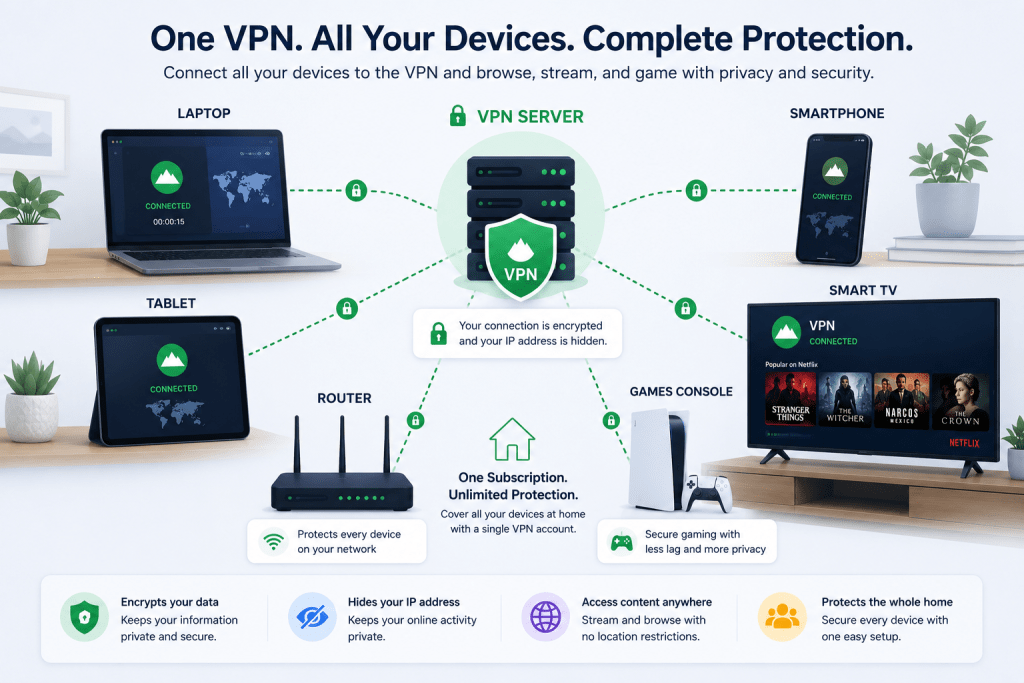
Installing a VPN on your router means every compatible device connected to your home network automatically uses the VPN. This is ideal for devices that don’t support VPN apps themselves, such as some smart TVs and game consoles.
The downside is that not every router supports VPN software, and configuration varies depending on the model. Some VPN providers sell pre-configured routers, which can make the process much simpler for beginners.
59. Can I use a VPN on a Smart TV?
Yes, although the method depends on the type of Smart TV you own.
Android TV and Google TV devices often allow VPN apps to be installed directly from the app store. Other televisions may require you to install the VPN on your router or use a streaming device such as an Amazon Fire TV Stick.
Once connected, your Smart TV can access the internet through the VPN just like any other device, helping protect your privacy and, where appropriate, allowing access to content available in other regions.
60. Can I use one VPN account on multiple devices?
In most cases, yes.
Nearly all premium VPN providers allow several simultaneous connections under a single subscription. Depending on the provider, this could be anywhere from five devices to unlimited connections.
That means you can often protect your phone, laptop, desktop computer, tablet and Smart TV without needing separate subscriptions.
Before signing up, it’s worth checking the provider’s device limit to make sure it matches your household’s needs. If several family members will be using the VPN, a provider offering unlimited connections may represent better value.
61. Does Windows include a VPN?
Yes, Windows includes built-in VPN support, but there’s an important distinction to understand.
Windows can connect to a VPN service if you already have one, but it doesn’t provide its own VPN network. Think of it as a VPN client rather than a VPN provider.
To use it, you’ll need to subscribe to a VPN service or connect to a business or school VPN that provides the necessary server details.
For most people, downloading the VPN provider’s own app is much easier. It includes automatic updates, faster server selection and additional features such as a kill switch and split tunnelling that aren’t available through Windows’ built-in settings.
62. Does Apple include a VPN?
Not exactly.
Like Windows, Apple’s devices support VPN connections, but Apple doesn’t provide a consumer VPN service with iPhones, iPads or Macs.
You can manually configure a VPN using the settings menu or, more commonly, install your chosen VPN provider’s app from the App Store. This is usually the simplest option, as it includes automatic server selection, security updates and extra privacy features.
Some Apple services, such as iCloud Private Relay, improve privacy in Safari, but they aren’t a replacement for a full VPN and don’t offer the same level of protection or location changing.
63. Can I use a VPN on Linux?
Yes.
Many leading VPN providers offer Linux support, although the experience can vary. Some provide full graphical applications, while others use command-line tools that require a little more technical knowledge.
Despite this, Linux users can still benefit from the same encrypted connections, IP address protection and server locations as Windows and Mac users.
If you regularly use Linux, it’s worth checking how well a VPN supports your chosen distribution before subscribing.
64. Can I use a VPN on Amazon Fire TV Stick?
Yes, and it’s one of the easiest streaming devices to use with a VPN.
Most major VPN providers have dedicated apps available directly from the Amazon Appstore. Installation usually takes just a few minutes, and once you’re signed in, you can connect to a server with a single click.
This makes the Fire TV Stick a popular choice for travellers or anyone who wants to access streaming services securely without configuring their entire home network.
A fast VPN is especially important here, as high-definition and 4K streaming require a stable connection.
65. Can I install a VPN on Chromecast?
The answer depends on which Chromecast model you have.
Newer Chromecast devices with Google TV support VPN apps directly, making installation straightforward. Older Chromecast models don’t have this capability, so you’ll usually need to install the VPN on your router or share a VPN connection from a computer.
Once configured, the Chromecast uses the VPN connection automatically whenever it accesses the internet.
If streaming is your main goal, it’s worth checking which setup method your specific device supports before you begin.
66. Are free VPNs safe?
Some are, but many aren’t.
There are a handful of well-known free VPNs from reputable companies that offer a limited version of their paid service. These are generally safe, although they often restrict data usage, server locations or connection speeds.
The biggest concern is with unknown free VPNs that have unclear privacy policies. Some make money by collecting user data, displaying adverts or selling browsing information to third parties.
If you’re trusting a company with all of your internet traffic, it’s worth taking the time to understand how it funds its service.
67. What’s the catch with free VPNs?
Running a global VPN network is expensive.
Servers, bandwidth, maintenance and customer support all cost money, so free VPN providers need another way to cover those costs. Some do this by offering a limited free plan alongside paid subscriptions, which is generally a fair approach.
Others may restrict your speeds, limit your monthly data allowance or reduce the number of available server locations.
Unfortunately, a small number of free VPNs have been found to collect user information or bombard users with advertising. That’s why it’s important to research the provider before installing any VPN app.
68. Do free VPNs sell your data?
Some do, although reputable providers generally don’t.
The VPN company can potentially see a significant amount of information about your connection, so trust is essential. If a provider has no obvious source of income, it’s reasonable to ask how it pays for its infrastructure.
Many respected VPN companies offer free plans that are funded by premium subscriptions rather than advertising or data collection. Others have been criticised for collecting usage information or sharing data with marketing partners.
Reading the privacy policy and looking for independent security audits can help you separate trustworthy providers from those you should avoid.
69. Are there any trustworthy free VPNs?
Yes.
Several well-established VPN companies offer free versions of their services that are designed to give users a taste of the premium experience. These providers are generally transparent about their limitations and don’t rely on selling user data.
The trade-off is that you’ll usually have fewer server locations, slower speeds or monthly data limits. If you only need occasional protection, that may be perfectly adequate.
For regular streaming, gaming or downloading, however, a paid VPN is almost always the better choice.
70. What’s the difference between free and paid VPNs?
The biggest differences are performance, features and reliability.
Paid VPNs generally offer faster servers, more locations around the world, unlimited bandwidth and advanced features such as kill switches, split tunnelling, malware blocking and dedicated streaming servers.
Free VPNs are often designed for light use. They may limit your monthly data allowance, restrict server choices or reduce connection speeds during busy periods.
If you only need a VPN occasionally, a reputable free plan might be enough. If you use a VPN every day, paying for a quality service usually provides a much better experience and greater peace of mind.
71. Are VPNs legal?
Yes, VPNs are legal in most countries around the world.
Businesses use VPNs every day to allow employees to securely access company networks, while millions of individuals use them to improve their online privacy, protect themselves on public Wi-Fi and secure their internet connections.
However, a VPN doesn’t make illegal activities legal. If something is against the law without a VPN, it’s still against the law when you’re using one.
It’s also worth remembering that a small number of countries place restrictions on VPN usage or only allow government-approved VPN services. If you’re travelling overseas, it’s sensible to check the local regulations before you arrive.
72. Which countries ban or restrict VPNs?
Most countries allow VPNs, but a handful have introduced restrictions or tight controls over their use.
In some places, VPN providers must comply with local regulations before they can legally operate. In others, access to certain VPN services may be blocked altogether, making it more difficult to establish a secure connection.
Countries occasionally update these rules, so it’s always worth checking the latest guidance before travelling. If you’re visiting a country with internet restrictions, installing your VPN before you leave home is usually the safest approach.
Remember that laws can change, so don’t rely on outdated information.
73. Can I use a VPN in China?
Yes, but it’s not always straightforward.
China operates one of the world’s most sophisticated internet filtering systems, often referred to as the Great Firewall. Many VPN services are blocked, and connections can become unreliable without warning.
Some VPN providers offer specialised technologies designed to make VPN traffic appear like normal internet traffic, which can improve reliability. Even then, there’s no guarantee that every server will work all the time.
If you’re travelling to China, it’s generally recommended to install your VPN before you enter the country, as downloading VPN apps once you’re there may be difficult.
74. Can I use a VPN in the UAE?
VPNs are available in the United Arab Emirates, but it’s important to understand how they’re regulated.
Many residents and businesses use VPNs for legitimate purposes, such as securing remote work connections or protecting personal privacy. However, using a VPN to commit unlawful activities or bypass certain local regulations can lead to legal consequences.
Before travelling, it’s worth familiarising yourself with the latest local laws so you know what’s permitted.
Using a VPN responsibly is very different from assuming it exempts you from local legislation.
75. Can I use a VPN while travelling?
Absolutely, and it’s one of the best times to use one.
Travelling often means connecting to hotel Wi-Fi, airport networks and public internet connections that you know very little about. A VPN encrypts your connection, making it much harder for anyone on the same network to intercept your data.
It can also help you securely access online banking, work systems and other services you normally use at home.
Many travellers simply set their VPN to connect automatically whenever they join an unfamiliar Wi-Fi network, so they don’t have to think about it.
76. Should I install a VPN before travelling?
Yes, that’s usually the best approach.
Although VPN apps can normally be downloaded anywhere, some countries restrict access to VPN websites or app stores. Installing everything before you leave ensures you already have the software, your account is activated and you’ve confirmed it works correctly.
It’s also worth downloading a few different server locations and making a note of your account details in case you need them while you’re away.
Spending five minutes preparing before your trip can save a lot of frustration later.
77. Can hotels block VPNs?
Sometimes they can.
Most hotels don’t actively prevent guests from using VPNs, but some networks restrict certain types of encrypted traffic or block uncommon ports. This is more common in business hotels, conference venues or countries with tighter internet controls.
If your VPN won’t connect, switching to a different protocol such as WireGuard, OpenVPN TCP or another available option often solves the problem.
In many cases, the issue isn’t the hotel intentionally blocking VPNs but simply the way its network has been configured.
78. How do I choose the best VPN?
The best VPN isn’t necessarily the one with the biggest advertising budget.
Start by thinking about why you need one. If your main priority is streaming, look for providers with excellent access to popular services. If privacy matters most, focus on independently audited no-logs policies, strong encryption and a good reputation.
You’ll also want fast speeds, a wide choice of server locations, easy-to-use apps and responsive customer support.
Reading independent reviews and comparing real-world testing results will usually tell you far more than marketing slogans.
79. Which VPN is best for beginners?
A good beginner-friendly VPN should be simple to install and even easier to use.
The best services have clean, uncluttered apps with a clear Connect button, automatic server recommendations and sensible security settings enabled by default.
Helpful customer support, clear setup guides and apps for all major devices also make a big difference if you’ve never used a VPN before.
Fortunately, most leading VPN providers are designed with beginners in mind, so you don’t need to be particularly technical to get started.
80. What features should I look for in a VPN?
The essentials are strong encryption, a verified no-logs policy, fast connection speeds and a reliable network of servers.
Beyond that, features such as a kill switch, split tunnelling, WireGuard support, malware blocking and multi-factor authentication can all improve your experience.
It’s also worth considering practical factors like the number of simultaneous device connections, whether the VPN works well with streaming services and how responsive customer support is if you ever need help.
Rather than choosing the provider with the longest feature list, focus on the features you’ll actually use every day.
81. What is a kill switch?
A kill switch is one of the most important security features a VPN can offer.
If your VPN connection unexpectedly drops, a kill switch immediately blocks your internet connection until the VPN reconnects. Without it, your device could briefly reconnect using your normal internet connection, exposing your real IP address.
For everyday web browsing, this brief interruption might not matter much. But if you’re downloading files, working remotely or simply want to ensure your privacy isn’t interrupted, a kill switch provides valuable peace of mind.
Most premium VPNs include this feature, and it’s worth enabling if it’s available.
82. What is split tunnelling?
Split tunnelling lets you choose which apps or websites use the VPN and which connect directly to the internet.
For example, you might want your web browser to use the VPN for added privacy while allowing your online banking app to connect normally. Or perhaps you want your torrent client protected by the VPN while your streaming service uses your regular connection.
This flexibility can improve performance and solve compatibility issues without having to disconnect the VPN completely.
Not every VPN offers split tunnelling, and the feature may work differently depending on your device and operating system.
83. Which VPN protocol should I use?
The best protocol depends on what you’re trying to achieve.
For most people, WireGuard is an excellent choice because it combines strong security with impressive speed and efficiency. It’s become the default recommendation for many VPN providers.
OpenVPN remains one of the most trusted protocols available and is widely supported across different devices. IKEv2 is another popular option, particularly for mobile users who regularly switch between Wi-Fi and mobile networks.
If you’re unsure, the default protocol selected by your VPN app is usually the best place to start.
84. What’s the difference between OpenVPN and WireGuard?
Both are secure VPN protocols, but they’re designed with slightly different priorities.
OpenVPN has been around for many years and has built an excellent reputation for security and reliability. It’s compatible with almost every platform and is widely trusted throughout the cybersecurity industry.
WireGuard is much newer and was designed to be simpler, faster and more efficient. In many speed tests, it outperforms OpenVPN while maintaining a high level of security.
For most everyday users, WireGuard offers the best balance of speed and protection, although OpenVPN remains a fantastic option if compatibility is your priority.
85. What is MultiHop or Double VPN?
MultiHop, sometimes called Double VPN, routes your internet traffic through two VPN servers instead of one.
For example, your connection might travel from the UK to the Netherlands before exiting through Canada. This adds another layer of privacy because no single VPN server handles your complete journey.
The trade-off is that using two servers generally reduces your connection speed more than using a standard VPN connection.
For most people, a regular VPN connection is more than enough. MultiHop is mainly aimed at users who want an extra level of privacy.
Image suggestion: Clean infographic comparing a standard VPN connection with a MultiHop connection. Show one route passing through a single VPN server and another passing through two VPN servers before reaching the internet. Alt text: Comparison of a standard VPN versus a MultiHop VPN connection.
86. Should I pay monthly or yearly for a VPN?
It depends on how long you expect to use it.
Monthly plans offer flexibility because you can cancel at any time, making them ideal if you only need a VPN for a short trip or a temporary project.
Annual and multi-year subscriptions almost always provide much better value. Many VPN providers offer significant discounts for longer commitments, reducing the monthly cost considerably.
If you’ve already decided you’ll be using a VPN regularly, choosing a longer subscription is often the more economical option.
87. How much should a VPN cost?
Premium VPNs are generally more affordable than many people expect.
If you pay month by month, you’ll usually spend somewhere between £8 and £12 per month, depending on the provider and the features included.
Long-term subscriptions often reduce that cost dramatically, sometimes bringing it down to just a few pounds per month.
The cheapest option isn’t always the best value. It’s usually worth paying a little more for a provider with a strong reputation, independently audited privacy practices and reliable customer support.
88. Can a VPN leak my IP address?
Yes, although it shouldn’t happen if everything is working correctly.
IP leaks are uncommon with reputable VPN providers, but they can occur if the VPN disconnects unexpectedly or there’s a software issue.
Most premium VPNs include safeguards such as kill switches and leak protection to minimise this risk.
If you’re concerned, you can easily test your connection using one of the many online IP leak testing tools before relying on the VPN for sensitive activities.
89. What is a DNS leak?
A DNS leak happens when your device continues using your internet provider’s DNS servers instead of the VPN’s DNS servers.
Even though your browsing traffic may still be encrypted, DNS requests could reveal which websites you’re visiting.
Most modern VPNs automatically route DNS requests through their own secure DNS servers to prevent this from happening.
It’s a good idea to perform a DNS leak test after installing a new VPN, especially if privacy is one of your main reasons for using the service.
90. How do I test if my VPN is working?
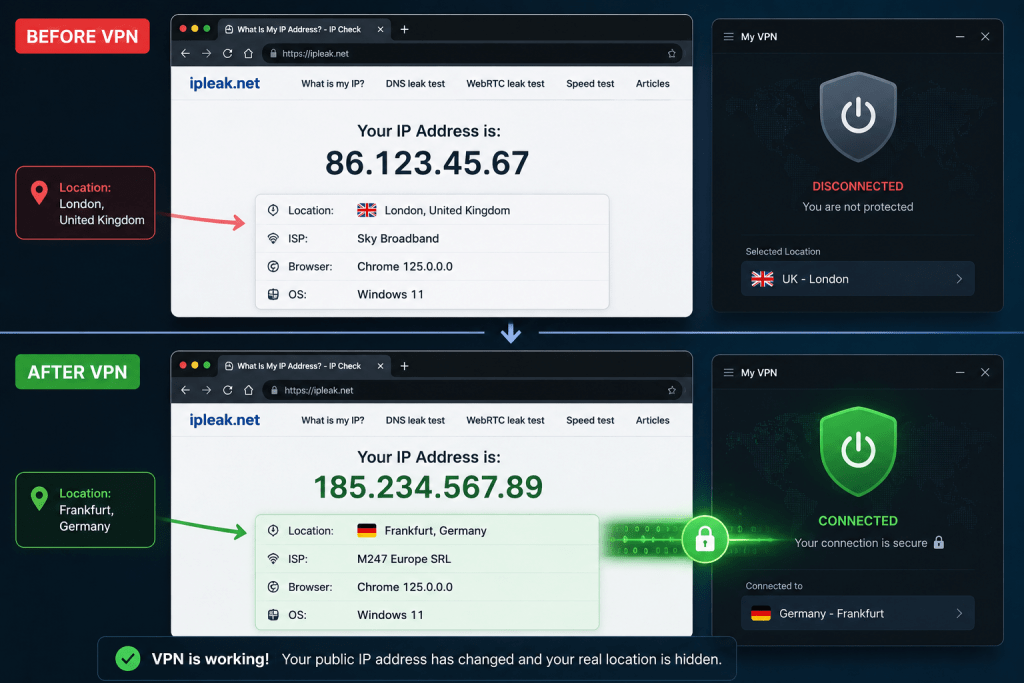
The simplest way is to check your IP address before and after connecting.
Without a VPN, websites will display your normal public IP address and approximate location. Once connected, those details should change to match the VPN server you’ve selected.
You can also use online tools to check for DNS leaks, WebRTC leaks and IPv6 leaks if your VPN supports IPv6 protection.
Running these quick tests every so often can give you confidence that your VPN is protecting your connection as expected.
91. Why does my VPN keep disconnecting?
Occasional disconnections can happen for several reasons.
The most common causes include an unstable internet connection, temporary server issues, aggressive battery-saving settings on mobile devices or outdated VPN software.
If the problem happens regularly, try switching to another server, updating the VPN app or changing the connection protocol. Restarting your router can also help if your home internet connection is unstable.
If disconnects continue, it’s worth contacting your VPN provider’s support team, as they may already be aware of an issue affecting a particular server.
92. Can I leave my VPN on all the time?
Yes, and many people do.
Modern VPN apps are designed to run continuously in the background with very little impact on everyday use. Leaving your VPN connected means your traffic is consistently encrypted whenever you’re online.
There may be occasional situations where you’ll want to disconnect temporarily, such as accessing local devices on your home network or using a website that doesn’t work properly with VPN connections.
For most people, though, leaving the VPN switched on all the time is perfectly reasonable.
93. Should I use the nearest server?
In most situations, yes.
Connecting to a nearby server usually gives you the best balance of speed and low latency because your data doesn’t have to travel as far.
There are exceptions. If you’re trying to access content that’s only available in another country, you’ll need to choose a server in that location instead.
For general browsing, streaming and gaming, your VPN’s automatic server selection often chooses the best nearby option for you.
94. Which server location should I choose?
That depends on what you’re trying to do.
If your priority is speed, choose a server that’s geographically close to you. If you’re travelling and want to access services from home, connect to a server in your home country.
Some VPN providers also label servers for specific purposes, such as streaming, gaming or peer-to-peer file sharing. These can be a good starting point if you’re unsure which location to select.
Don’t be afraid to experiment. Switching servers only takes a few seconds and can sometimes make a noticeable difference.
95. Can I use a VPN with antivirus software?
Yes, and it’s actually recommended.
A VPN and antivirus software do completely different jobs. A VPN protects your internet connection and improves your online privacy, while antivirus software detects and removes malicious files from your device.
Using both together gives you more complete protection than relying on either one alone.
Many premium VPN providers now include basic malware blocking, but dedicated antivirus software is still the better choice for protecting your device from viruses, ransomware and other threats.
96. Which VPN is the best overall?
There’s no single VPN that’s perfect for everyone.
The right choice depends on what matters most to you. Some providers excel at streaming, others focus on privacy, while some offer the best value for money or the fastest speeds.
Before choosing a VPN, think about how you’ll actually use it. A frequent traveller may have different priorities from someone who mainly wants to stream films at home.
Comparing independent reviews, real-world testing and long-term reliability will usually lead to a better decision than choosing the biggest brand name.
97. Which VPN is the fastest in 2026?
The fastest VPN can change as providers upgrade their networks, introduce new technologies and expand their server infrastructure.
Rather than relying on one-off speed tests, it’s better to look for providers that consistently deliver excellent performance across different countries and at different times of day.
Modern protocols such as WireGuard have helped narrow the gap considerably, and many leading VPNs now deliver speeds that are more than fast enough for 4K streaming, gaming and large downloads.
Regular testing is the only reliable way to identify the current leaders.
98. Which VPN is best for privacy?
If privacy is your main concern, focus less on marketing and more on evidence.
Look for providers with independently audited no-logs policies, strong encryption, RAM-only servers, transparent ownership and a proven history of protecting customer privacy.
Features such as MultiHop, private DNS, kill switches and tracker blocking can provide additional protection, but they’re most valuable when backed by a trustworthy company.
Ultimately, privacy depends on both the technology and the organisation operating it.
99. Which VPN offers the best value for money?
The best value isn’t always the cheapest subscription.
A VPN that costs slightly more but delivers faster speeds, reliable streaming access, excellent customer support and regular security audits may save you frustration in the long run.
Look at the overall package rather than focusing solely on price. Device limits, refund policies, independent audits and long-term subscription discounts can all affect the value you receive.
A little research before subscribing can pay off for years.
100. Is a VPN still worth using in 2026?
For most people, yes.
The internet has become more connected than ever, and concerns around privacy, online tracking and cybersecurity haven’t disappeared. Whether you’re working remotely, travelling, streaming, gaming or simply browsing the web, a VPN remains one of the easiest ways to improve your online privacy.
It’s important to have realistic expectations. A VPN won’t make you completely anonymous, stop every cyber threat or replace good security habits. But when combined with strong passwords, two-factor authentication and sensible online behaviour, it adds a valuable layer of protection.
If you spend any amount of time online, a reputable VPN is still a worthwhile investment. The key is choosing one that matches your needs rather than assuming every provider offers the same level of performance, privacy and reliability.